How to obtain integration keys for Admin API?
Integration keys can be obtained from the Duo Admin Console, by following these steps:
- In the Duo Admin Console, go to Applications, and click the “Protect an Application”.

2. It will open a new page, which will list all possible applications that can be integrated with Duo. You can use the search bar to find the Admin API. Once found, click “Protect”.

3. The configuration page for the API will contain the Integration Key, Secret Key and API Hostname. All information are needed when running API scripts.
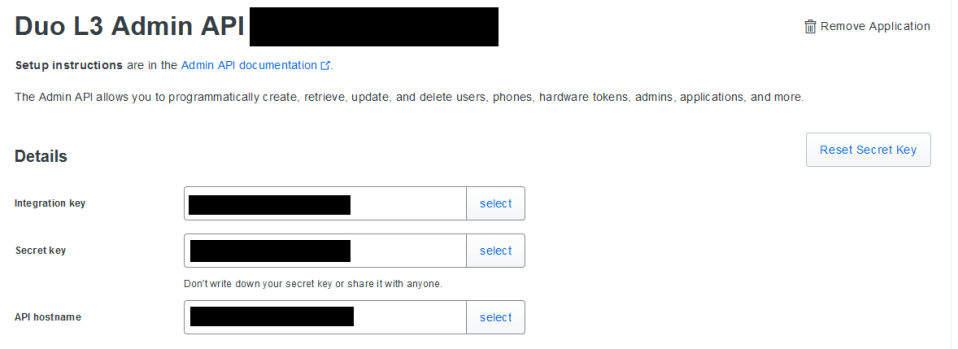
Below is an example of the contents of the file that will be referenced by API scripts. Make sure that this file saved in the same directory as the script you want to run.
DUO_IKEY = "INTEGRATION KEY FROM YOUR PROTECTED APPLICATION"
DUO_SKEY = "SECRET KEY FROM YOUR PROTECTED APPLICATION"
DUO_APIHOSTNAME = "API HOSTNAME FROM YOUR PROTECTED APPLICATION"
4. In the settings section, you customize the name of the integration, as well as the permissions that will be granted. It is better to give only the access needed in order to avoid unwanted changes by the API scripts.
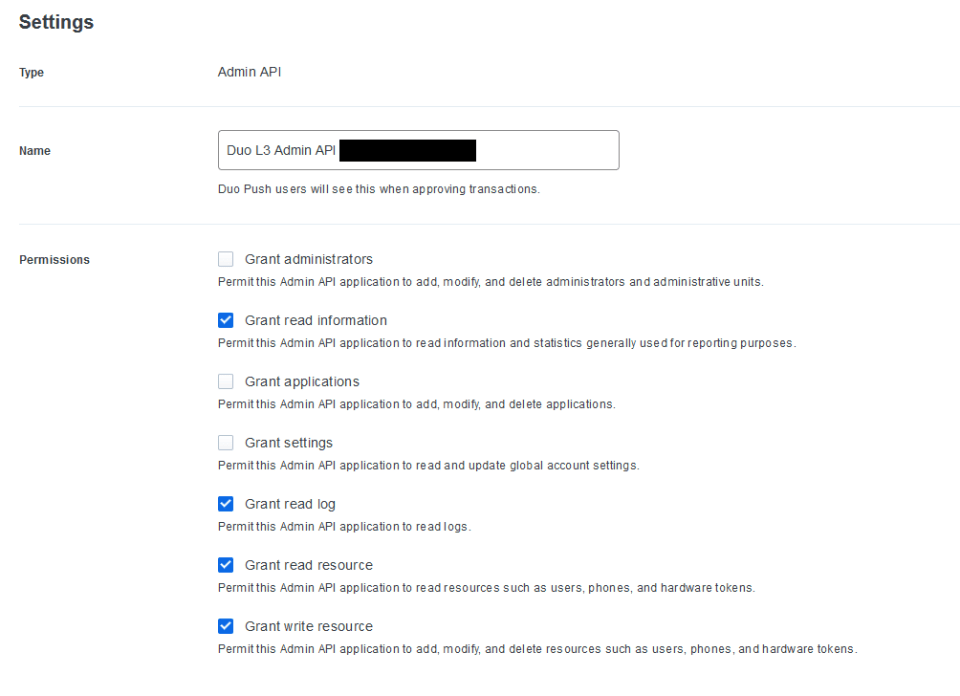
5. Additionally, you can limit the IP addresses from where the scripts can be ran. That way, if your company has strict policies about accessing resources only from the corporate network, external IP addresses will not be permitted.

 Project Puchufy