This is a Python script for unassigning hardware tokens from multiple users.
Pre-requisites:
- Source file token_unassign.csv which will contain the following columns: tokenserial, username, type. This CSV file will contain the list of users and the hardware token serial number that will be assigned to them.
- Python Modules: pytz, colorama
- Assuming you have already installed the Duo Admin API
- The file my_duo_keys is where you have your Duo Admin API credentials. Check this article if you need help in how to obtain the integration keys: My Duo Keys for Admin API using Python.
# imports for the Duo Admin API calls
import duo_client
import csv
import sys
import pytz
from pytz import timezone
from datetime import datetime, timedelta
from colorama import init
from colorama import Fore, Back, Style

# imports IKEY, SKEY, and API Hostname stored in another file
from my_duo_keys import *
admin_api = duo_client.Admin(ikey=DUO_IKEY, skey=DUO_SKEY, host=DUO_APIHOSTNAME)
init()
print(" ")

tz_PST = timezone('Asia/Singapore')
sa_time = datetime.now(tz_PST)
current_time = (sa_time.strftime('%Y-%m-%d %H:%M:%S') + " " + str(tz_PST))
print(Fore.CYAN + "-------------------------------------------------------------------")
print(Fore.GREEN + "************ REMOVING HARDWARE TOKENS FROM USERS ************")
print(Fore.GREEN + "Time Started: " + current_time)
print(Fore.CYAN + "-------------------------------------------------------------------")
# open the CSV file and read from it line-by-line until the end of the file
with open('token_unassign.csv') as csvfile:
  reader = csv.reader(csvfile)
  next(reader, None)
  count = 1
  success=0
  failed=0

  for row in reader:
    tokenserial = row[0]
    username=row[1]
    tokentype=row[2]
      try:
        user_id = admin_api.get_users_by_name(username=username)
        for a in user_id:
          user_id = a['user_id']
        token_id = admin_api.get_tokens_by_serial(type=tokentype,serial=tokenserial)
        for b in token_id:
          token_id=b['token_id']
        admin_api.delete_user_token(user_id,token_id)
        print(Fore.CYAN + "(" + str(count) + ") " + "SN: " + tokenserial + " | User: " + username + " ...SUCCESS!")
        count += 1
        success += 1

      # handles errors that may come up due to the API calls above
      # the variable 'e' is the error and calling print(e) will display the error message
      except Exception as e:
        print(Fore.RED + "(" + str(count) + ") " + "SN: " + tokenserial + " | User: " + username + " ...FAILED!")
        count += 1
        failed += 1

print(" ")
tz_PST = timezone('US/Pacific')
sa_time = datetime.now(tz_PST)
current_time = (sa_time.strftime('%Y-%m-%d %H:%M:%S') + " " + str(tz_PST))
print(Fore.CYAN + "-------------------------------------------------------------------")
print(Fore.GREEN + "Tokens Successfully Unassigned: " + str(success))
if failed > 0:
print(Fore.RED + "Tokens Failed to be Unassigned: " + str(failed))
print(Fore.RED + "** Please check username or SN for errors.")
print(Fore.GREEN + "Time Finished: " + current_time)
print(Fore.CYAN + "-------------------------------------------------------------------")
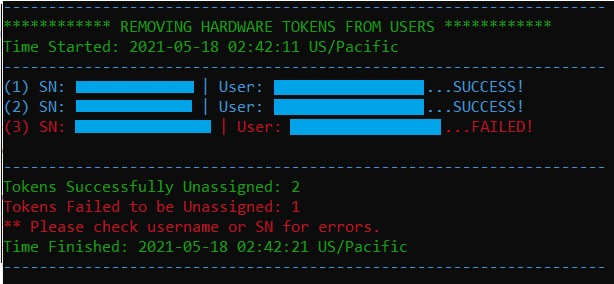
Sample Output:
 Project Puchufy